How Quantum Computing Will Change the World
How quantum computing will change the world: qubits explained simply, 7 big impacts from medicine to finance, the threat to encryption, timelines and how to prepare.
14 min read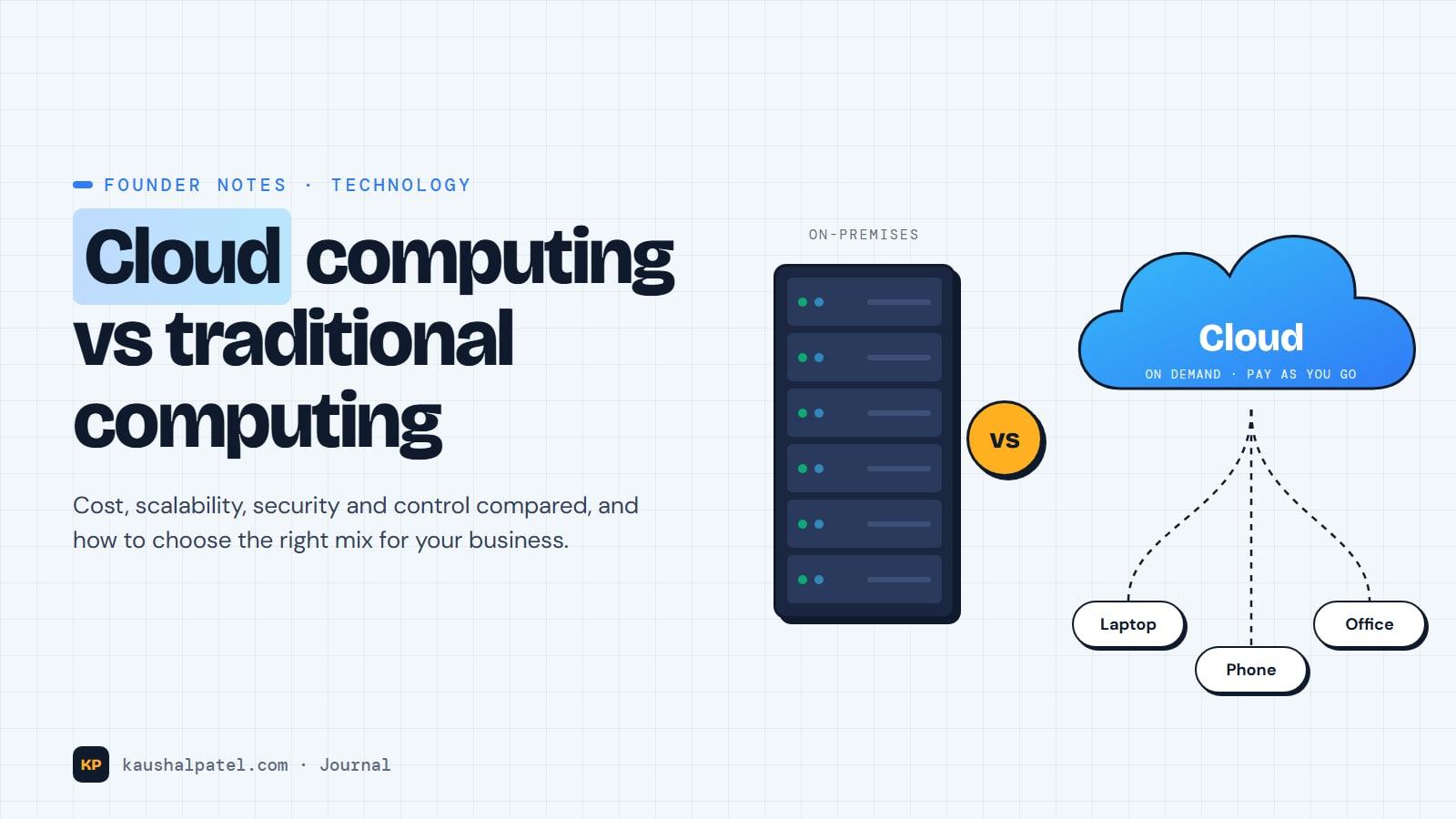
Every business runs on computers, but where those computers live has changed. For decades, companies bought their own servers, kept them in a back room or data centre, and hired people to look after them. Today, most new software runs in the cloud: on computing power you rent by the minute from providers such as Amazon Web Services, Microsoft Azure and Google Cloud.
So which is better? This guide compares cloud computing vs traditional computing in plain language: how each works, the real differences in cost, scalability, security, control and maintenance, and how to decide which one (or which mix) suits your business. You’ll find a side-by-side comparison table, animated examples, a decision guide, a cost worksheet and a step-by-step migration plan. I run my own products on both cloud platforms and self-managed servers, so this comes from practice, not a sales brochure.
Traditional computing, often called on-premises or “on-prem” computing, is the model where your organisation owns and operates its own IT infrastructure. You buy servers, storage, networking equipment and software licences, install them in your office or a data centre, and your team (or an IT contractor) manages everything: power, cooling, security patches, backups, hardware failures and upgrades.
Think of it like owning a car. You pay a lot upfront, you control exactly how it’s used, and every service, repair and replacement is your responsibility. A shop billing system on a desktop PC, an accounting server in the back office and a factory’s on-site ERP are all examples of traditional computing.
Cloud computing is the on-demand delivery of computing resources (servers, storage, databases, networking, software and analytics) over the internet, with pay-as-you-go pricing. Instead of owning hardware, you rent exactly what you need from a provider that runs huge data centres.
The widely used definition from the US National Institute of Standards and Technology (NIST) lists five essential characteristics of cloud computing:
To continue the analogy, cloud computing is like using a taxi or renting a car: no purchase, no maintenance, and you pay per trip. If you use Gmail, Google Drive, Microsoft 365, Zoho or Netflix, you already rely on cloud computing every day.
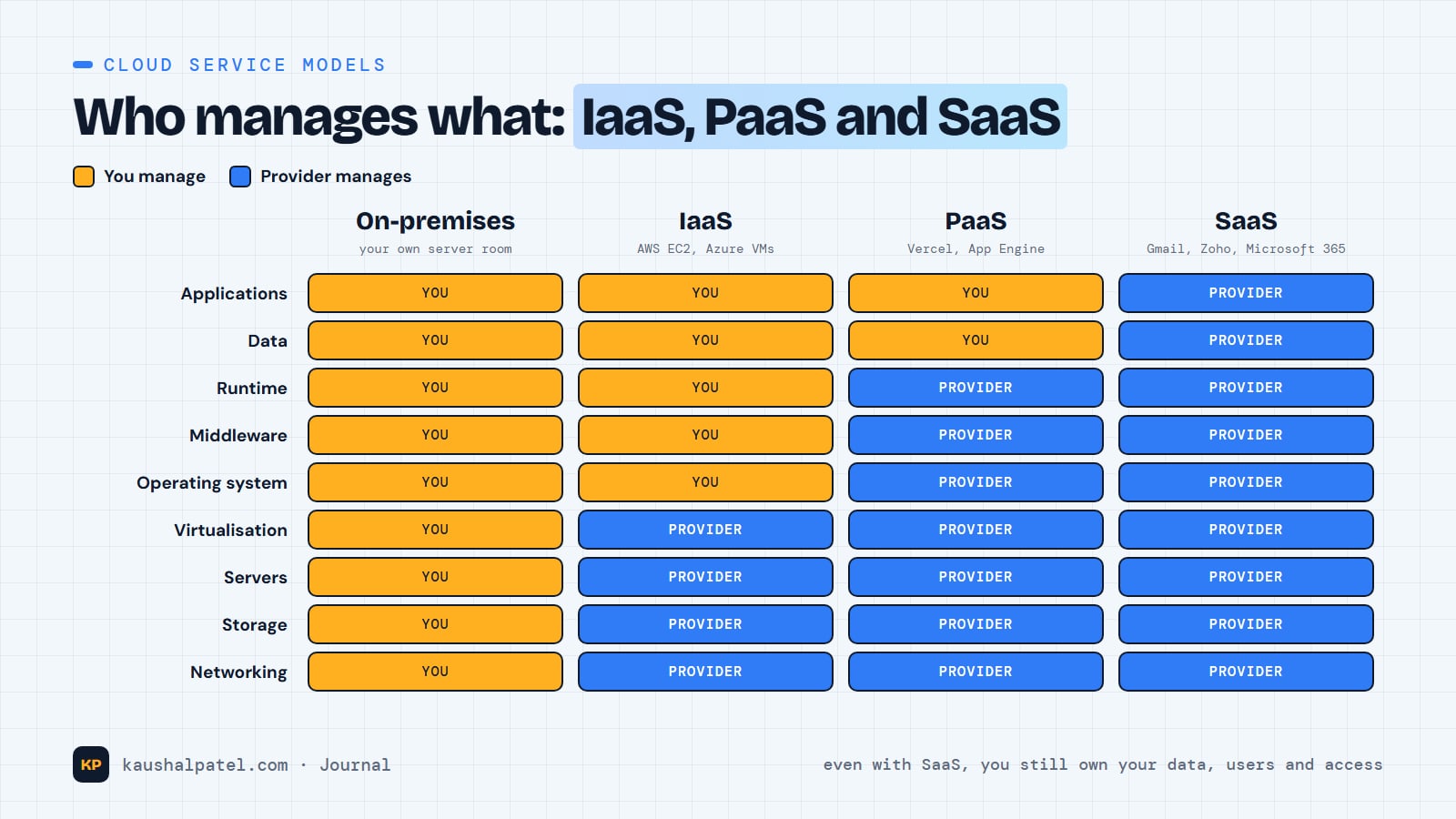
| Model | What you rent | You still manage | Examples |
|---|---|---|---|
| IaaS (Infrastructure as a Service) | Virtual servers, storage and networks | Operating system, software, data, security settings | AWS EC2, Azure Virtual Machines, Google Compute Engine, DigitalOcean |
| PaaS (Platform as a Service) | A ready platform to run your code | Your application and data | Vercel, Google App Engine, Azure App Service, Heroku |
| SaaS (Software as a Service) | Finished software, used in a browser or app | Your data, users and access settings | Gmail, Microsoft 365, Zoho, Shopify, Salesforce |
A practical example: deploying a website on Vercel is PaaS, while setting up your own VPS with Nginx and PM2 is closer to IaaS: more control, more work.
| Factor | Traditional (on-premises) | Cloud computing |
|---|---|---|
| Upfront cost | High: servers, licences, setup (capital expenditure) | Little or none: pay monthly for usage (operating expenditure) |
| Ongoing cost | Power, cooling, space, repairs, IT staff, hardware refresh | Usage bills, which can grow without monitoring |
| Scalability | Slow: buy and install new hardware (weeks) | Fast: scale up or down in minutes, often automatically |
| Setup time | Weeks to months | Minutes to days |
| Maintenance | Your team patches, repairs and upgrades everything | The provider maintains the hardware and core platform |
| Control | Full control over hardware, software and data location | Less control over the underlying infrastructure |
| Security | All on you: physical, network and software security | Shared: provider secures the cloud, you secure what you put in it |
| Access | Mainly from the office network, or via VPN | From anywhere with an internet connection |
| Backup and recovery | Manual, and often only on-site | Built-in options across multiple data centres |
| Internet dependency | Works on the local network even when the internet is down | Needs a reliable internet connection |
| Best for | Steady workloads, strict data rules, low-latency local systems | New projects, variable demand, remote teams, fast growth |
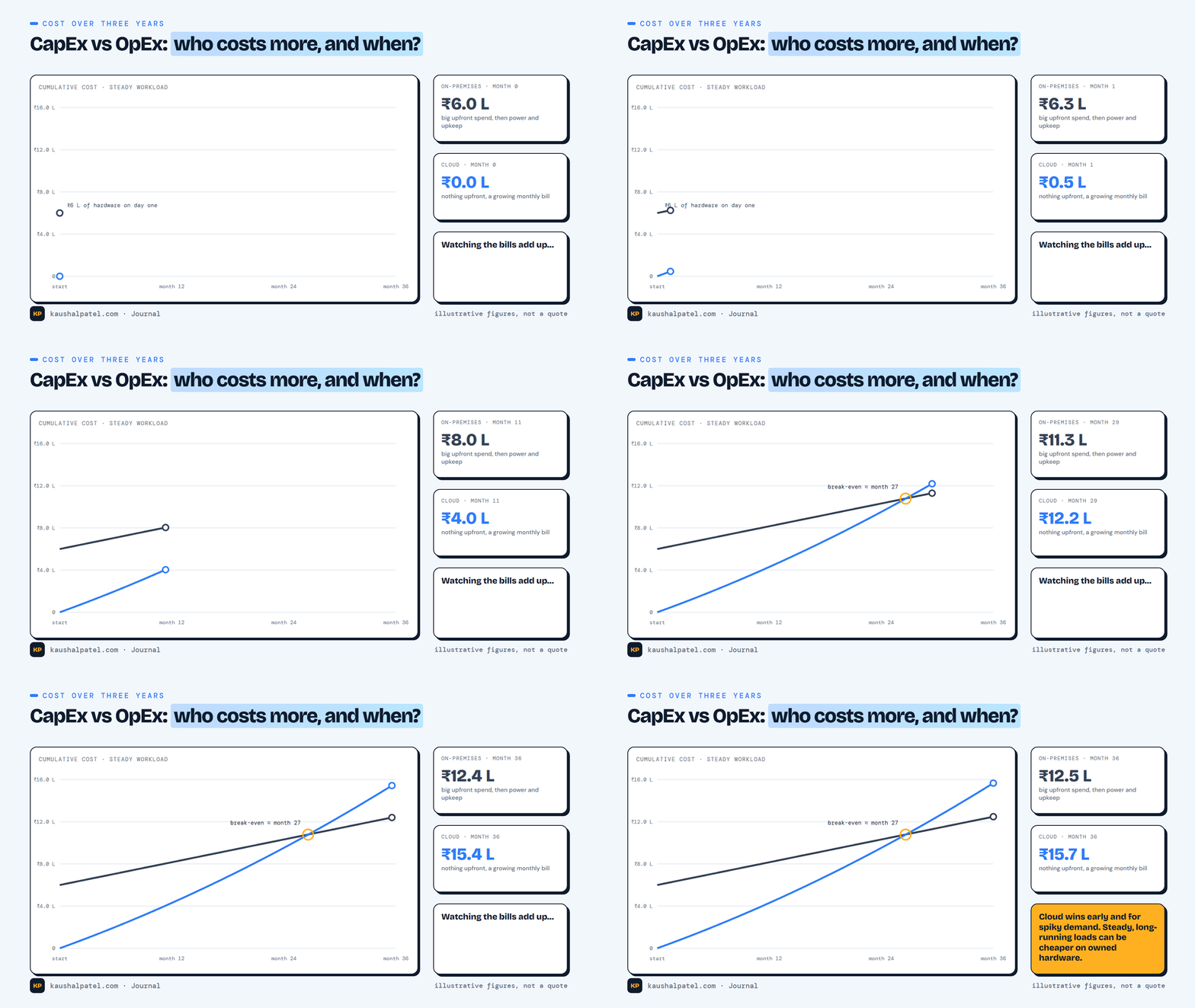
Traditional computing is a capital expenditure (CapEx): you pay a large amount upfront for hardware that you then use for three to five years. Cloud computing is an operating expenditure (OpEx): no big purchase, just a monthly bill based on what you use.
For a startup or a new project, this is a huge advantage. You don’t tie up cash in servers before you know whether the product works, which matters a lot when you’re bootstrapping or building an MVP. But cloud isn’t automatically cheaper. For steady, predictable workloads that run all day for years, owned or rented dedicated hardware can cost less over time. Some well-known companies, such as 37signals (the makers of Basecamp), have moved steady workloads off the public cloud for exactly that reason.
Compare the total cost of ownership (TCO), not just the server price or the monthly bill. Use this worksheet:
TOTAL COST OF OWNERSHIP (TCO) WORKSHEET · compare over 36 months

ON-PREMISES                              CLOUD
Hardware (servers, storage, network)     Compute (servers / functions)
+ Software licences                      + Storage and databases
+ Installation and setup                 + Data transfer out (egress)
+ Power and cooling × 36                 + Backups and snapshots
+ Space / rack rent × 36                 + Support plan
+ IT staff time × 36                     + Staff time to manage it × 36
+ Repairs and spare parts                + Monitoring and security tools
+ Backup drives and offsite copies
+ Hardware refresh (if over 3–5 years)
= TOTAL ON-PREMISES                      = TOTAL CLOUD

Rule of thumb: if demand is spiky or uncertain, cloud usually wins.
If it's steady and you have the skills to run servers, check both.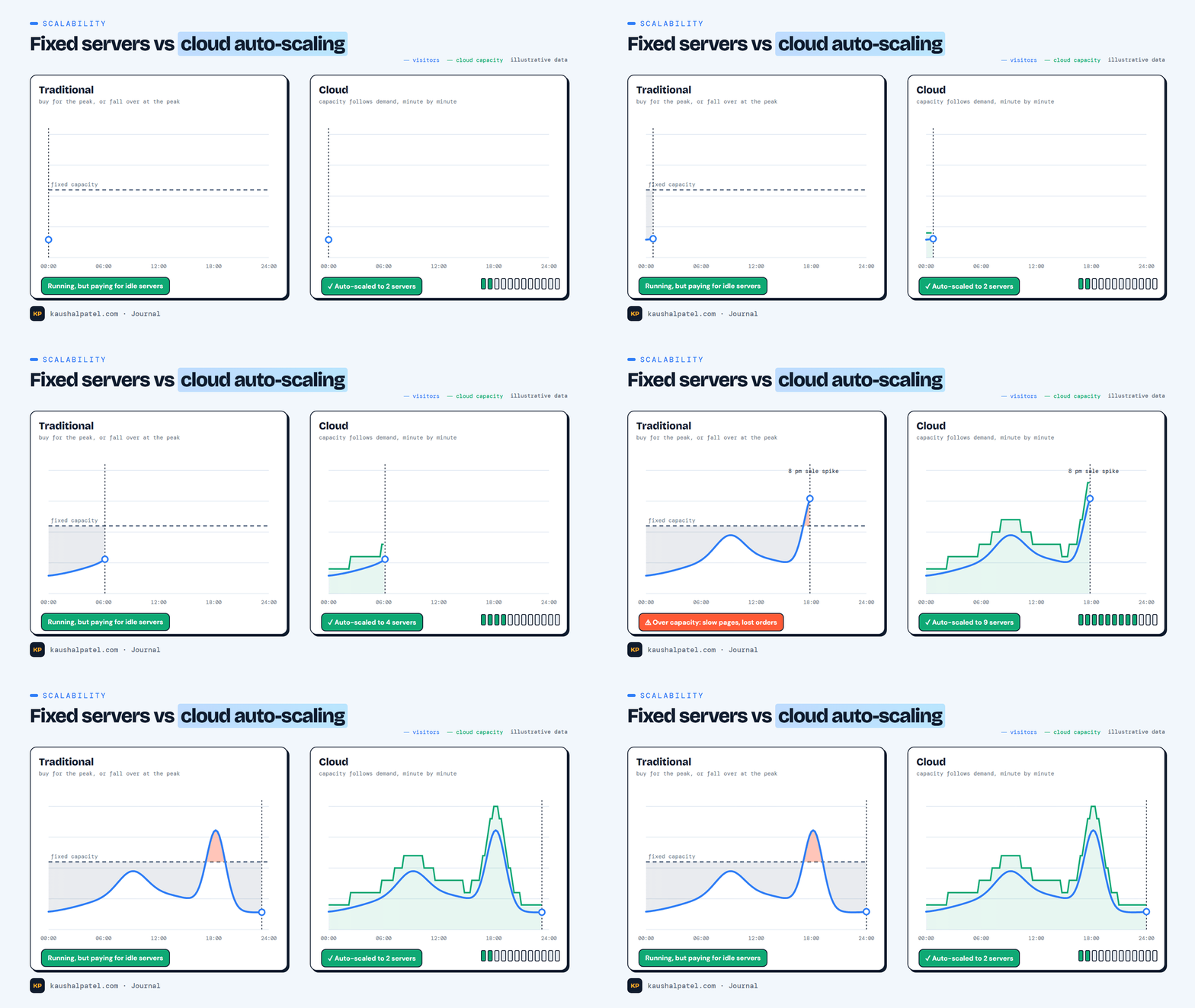
With traditional computing, you have to buy enough hardware for your busiest day. During a festive sale or a viral post, an under-sized server slows down or crashes; the rest of the year, an over-sized one sits idle while you keep paying for it.
Cloud platforms offer elasticity: you can add servers in minutes, and auto-scaling can add or remove capacity automatically based on traffic. This is one of the strongest reasons businesses with seasonal or unpredictable demand move to the cloud. It’s also why e-commerce brands selling on several channels at once rely on cloud platforms during sale events.
A common myth is that the cloud is less secure than your own server. In reality, the large cloud providers invest far more in physical security, network protection and compliance certifications than most small businesses ever could. But cloud security works on a shared responsibility model: the provider secures the infrastructure, and you secure what you put on it, including your accounts, passwords, access permissions, data and configuration.
Most cloud security incidents come from the customer side: weak passwords, no multi-factor authentication, publicly exposed storage buckets or leaked access keys. On-premises systems have their own risks, such as unpatched servers, physical theft and ransomware with no off-site backup. Either way, the human habits matter most. See cybersecurity threats everyone should know about for the attacks that affect both.
Traditional computing gives you complete control: you choose the hardware, decide exactly where data is stored and control every update. That matters in some industries. In India, for example, the Reserve Bank of India requires payment system data to be stored in India, and the Digital Personal Data Protection Act, 2023 sets rules on how personal data is handled.
The cloud can still meet many of these needs. AWS, Microsoft Azure and Google Cloud all run data centre regions in India, so you can choose to keep data in the country. But you’re trusting the provider’s platform, and you have less say in how it changes. Check your industry’s rules before choosing.
On-premises systems need someone to replace failed disks, apply security patches, renew licences, monitor backups and plan hardware upgrades. In the cloud, the provider handles the physical hardware and, with PaaS and SaaS, much of the software too. Your team can spend its time on the product and customers instead of server rooms.
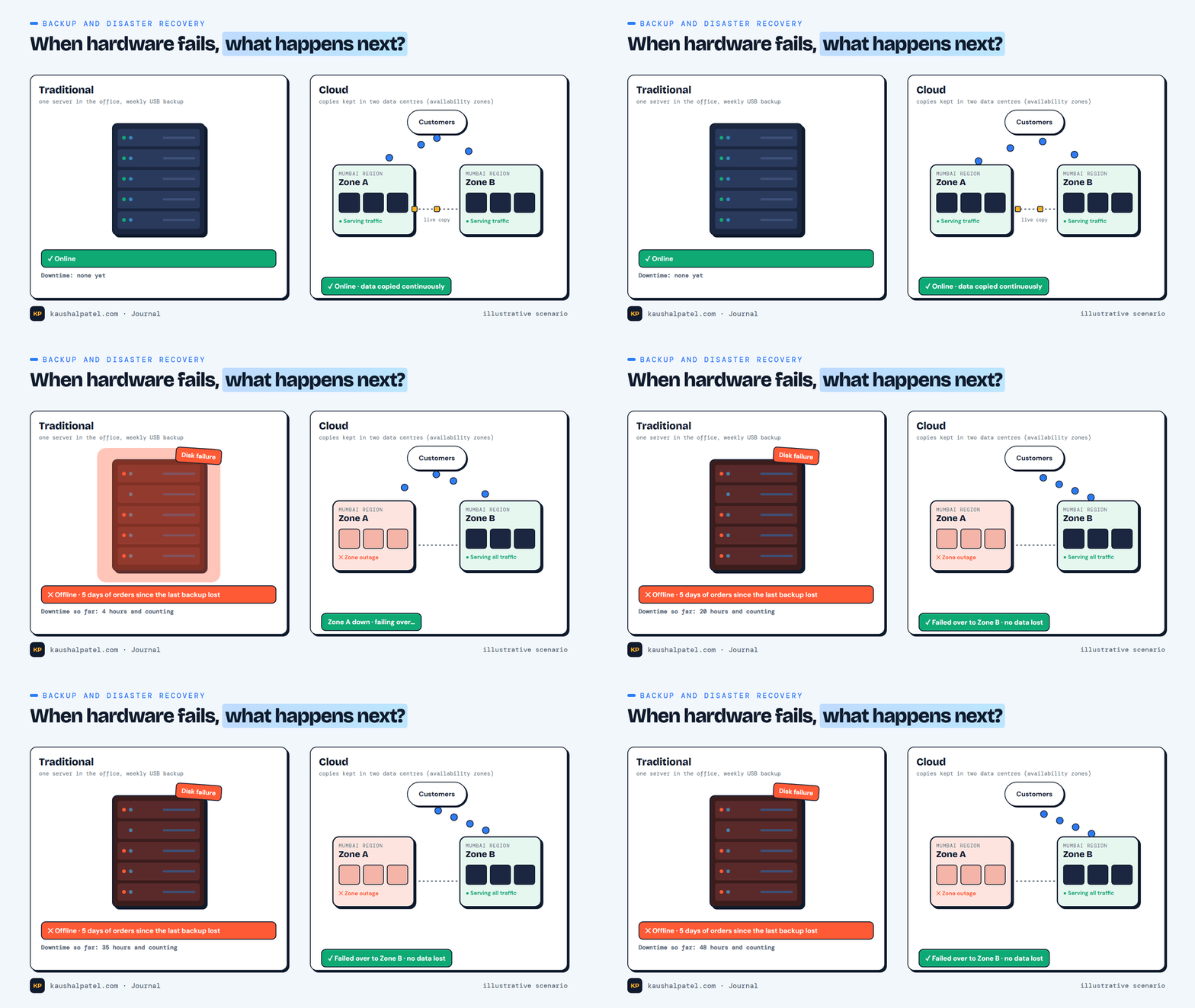
A single office server is a single point of failure. A disk crash, power surge, flood or ransomware attack can take your business offline and wipe out everything since the last backup. Cloud providers organise their data centres into regions and separate availability zones, so you can keep copies of your data and applications in more than one location and fail over automatically.
Note the word can: you still have to switch on backups, replication and multi-zone setups, and they cost extra. The cloud makes disaster recovery much easier, not automatic.
Cloud services depend on your internet connection. If your office connection goes down, so does access to cloud tools, unless you have a backup connection. Traditional systems on a local network keep working, which is why factories, hospitals and shops with critical on-site machines often keep some computing locally. For customers spread across the country or the world, however, the cloud is usually faster, because it can serve them from data centres and content delivery networks close to them.
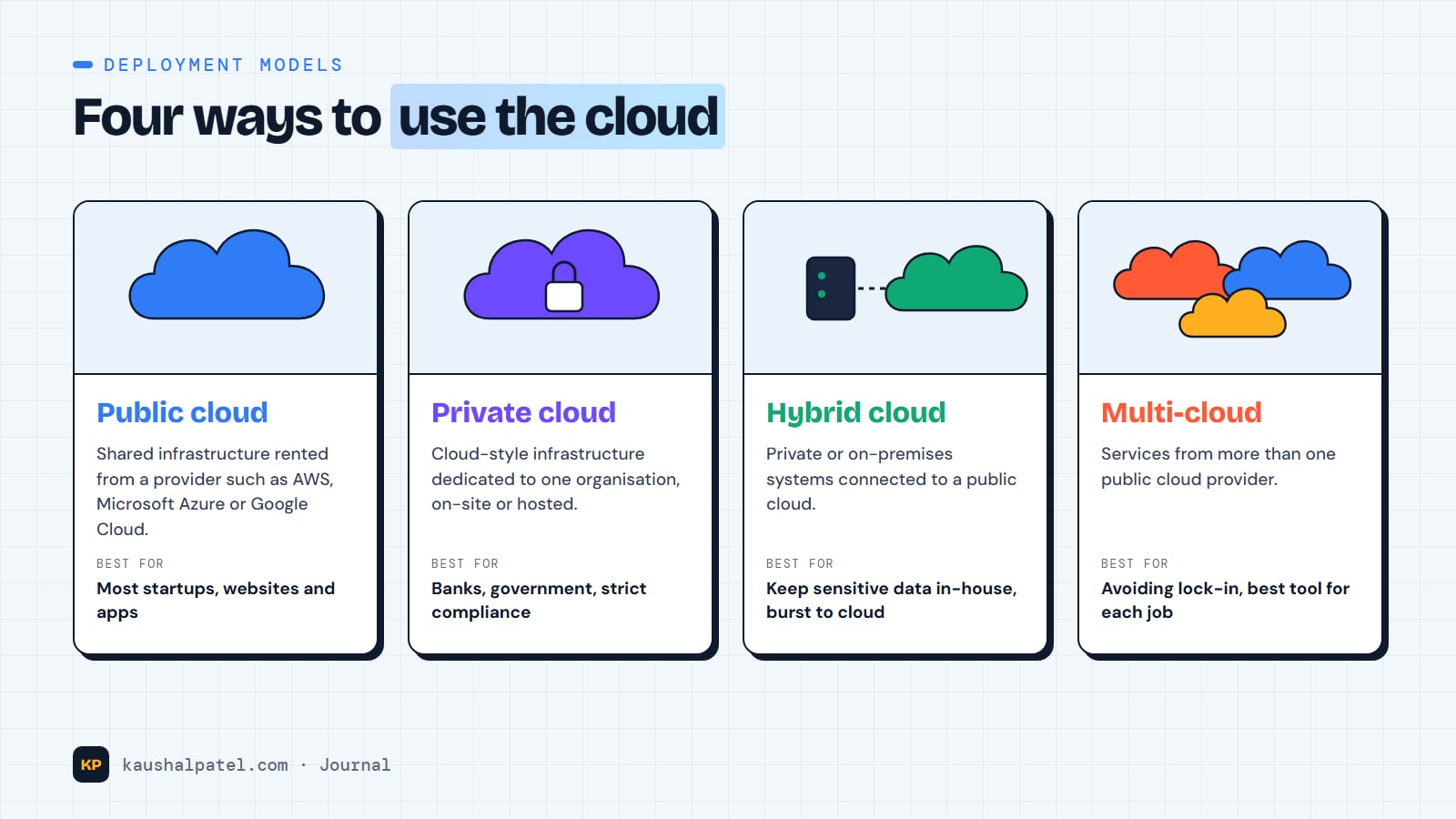
The choice isn’t simply “cloud or not”. Public cloud is the most common and cheapest to start with. Private cloud gives one organisation dedicated, cloud-style infrastructure. Hybrid cloud connects on-premises systems with public cloud services, for example keeping a factory’s production database on-site while running the website and analytics in the cloud. Multi-cloud uses more than one provider, to avoid depending on a single vendor or to use the best service for each job.
| Advantages | Disadvantages | |
|---|---|---|
| Traditional computing | Full control; predictable cost for steady workloads; works without internet; data stays on your premises; no recurring rental bills | High upfront cost; slow to scale; your team handles all maintenance and security; hardware ages; disaster recovery is harder |
| Cloud computing | No upfront hardware; scales in minutes; access from anywhere; provider handles hardware; built-in backup and recovery options; fast access to new services such as AI | Bills can grow without monitoring; needs reliable internet; less control; risk of vendor lock-in; data transfer (egress) fees; misconfiguration risks |
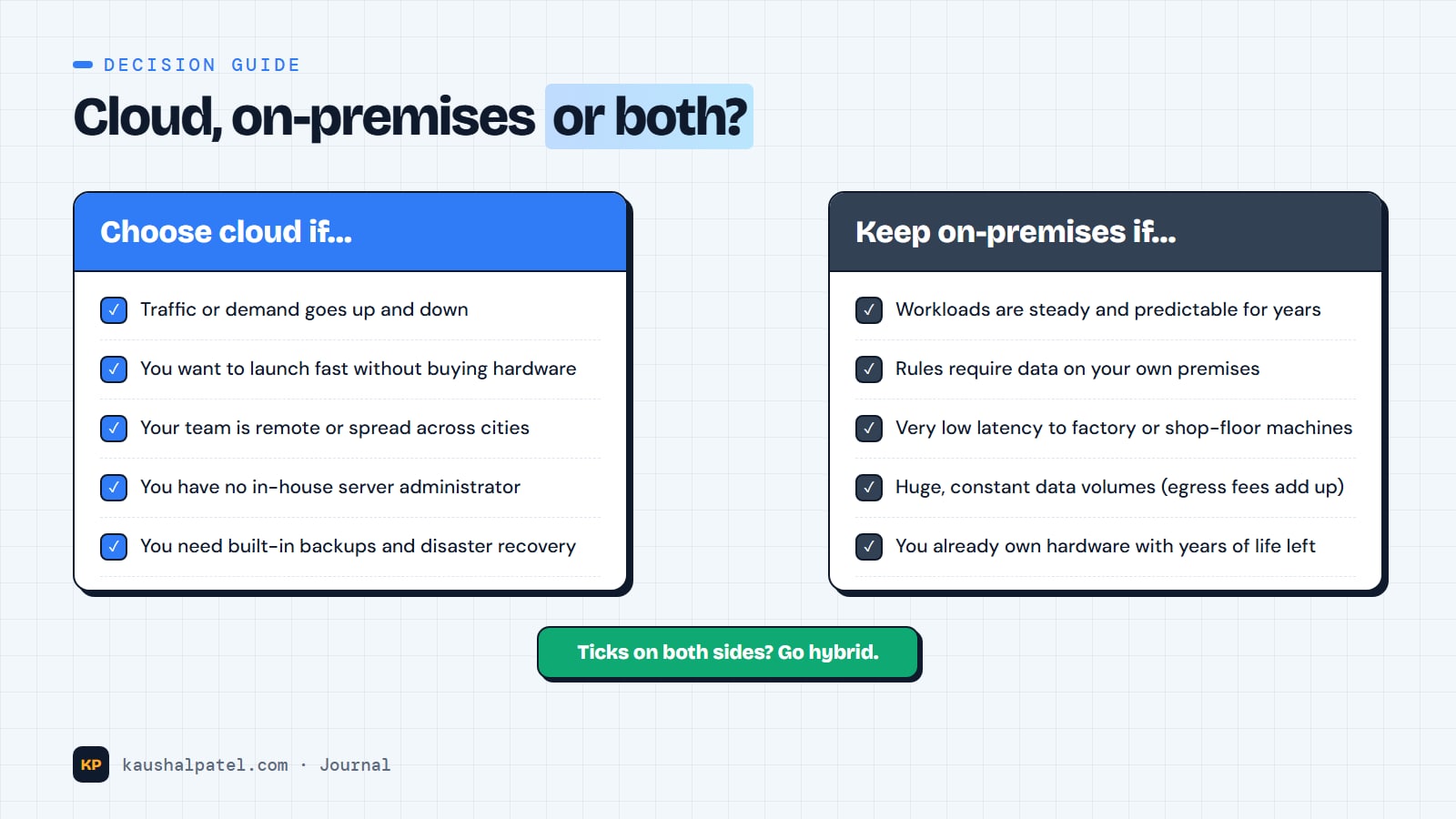
| Business type | Usually the best fit | Why |
|---|---|---|
| New startup or MVP | Cloud (PaaS and SaaS) | No upfront cost, launch in days, scale only if it works |
| Small office or shop | Cloud SaaS | Email, accounting, CRM and storage without an IT team |
| Online store with sale seasons | Cloud | Handles traffic spikes without paying for idle servers |
| Manufacturer with on-site machines | Hybrid | Local systems for the factory floor, cloud for everything else |
| Bank, hospital or government body | Private or hybrid cloud | Strict compliance and data-location requirements |
| Mature product with steady traffic | Compare both | Dedicated or owned servers may cost less over time |
The same thinking applies to software in general: renting a ready-made service is often smarter than building and running your own until your needs are clear. I go deeper into that trade-off in build vs buy: custom software vs SaaS, and into the tools a lean team actually needs in the solo founder tech stack for 2026.
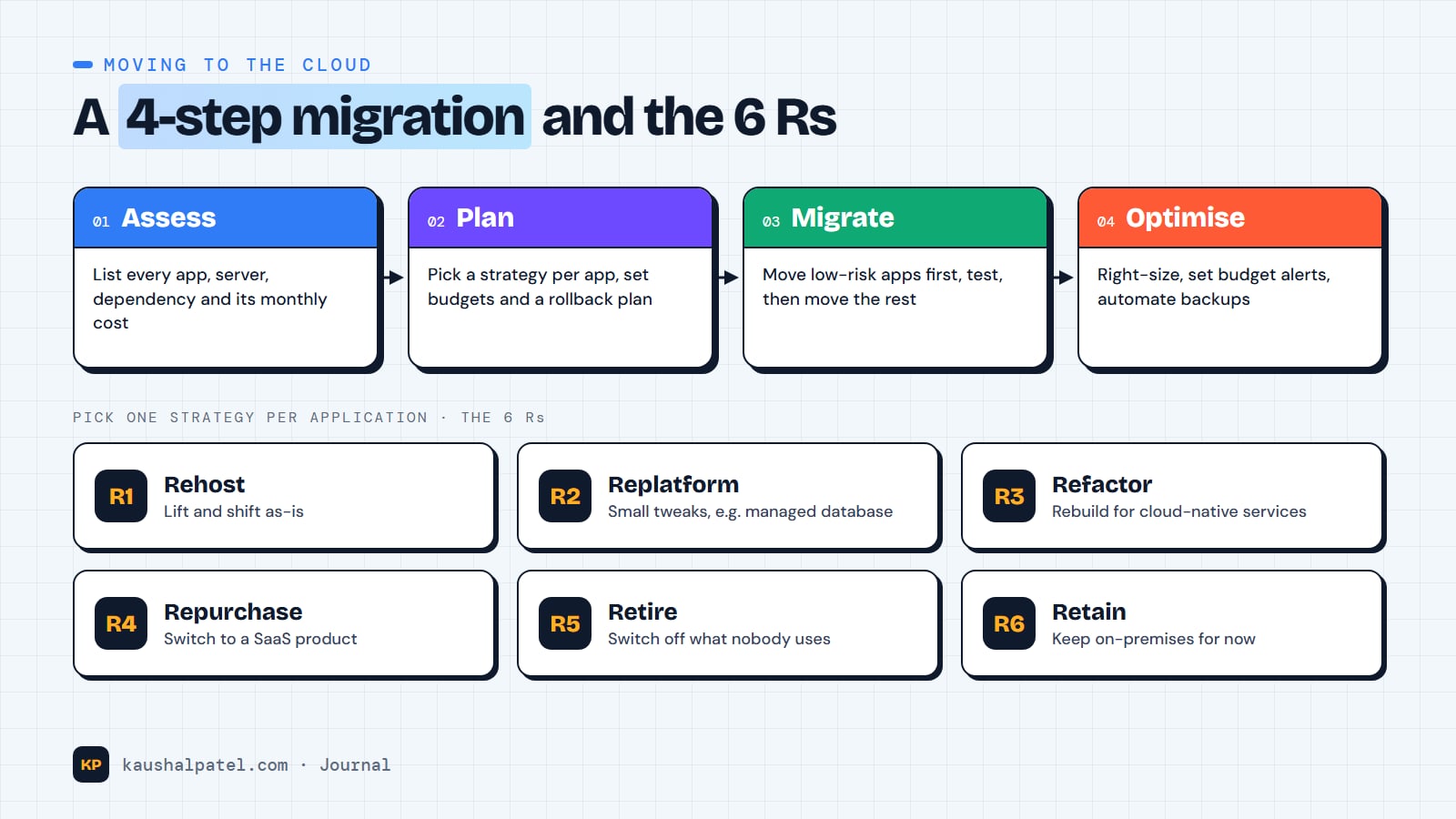
Migration is also a good moment to clean up your data. If your business runs on scattered spreadsheets and copies of copies, fix that first; see from spreadsheet chaos to a single source of truth. If your website is part of the move, choosing the right CMS matters as much as choosing the hosting.
The line between cloud and traditional computing keeps shifting. Edge computing brings processing closer to where data is created, such as factory sensors, shop cameras or delivery vehicles, while still connecting to the cloud. Serverless platforms let developers run code without thinking about servers at all. And the AI boom runs largely on cloud infrastructure, because training and running large models needs specialised hardware that few businesses can buy themselves. For more on where this is heading, read how AI is changing the future of technology and how blockchain works beyond cryptocurrency.
With traditional computing, you buy, own and maintain your own hardware and software on your premises. With cloud computing, you rent computing resources over the internet from a provider and pay for what you use, without managing the physical hardware.
Usually for new projects, small teams and variable demand, because there is no upfront hardware cost and you can scale down when demand falls. For steady, predictable workloads running for several years, owned or dedicated hardware can be cheaper. Compare the total cost of ownership over three years.
Major cloud providers offer stronger infrastructure security than most businesses can build themselves. But security is shared: you are still responsible for passwords, access, configuration and data. Most cloud breaches come from customer-side mistakes.
Gmail, Google Drive, Microsoft 365, Zoho, Netflix and Shopify are SaaS examples. Vercel and Google App Engine are PaaS examples. AWS EC2, Azure Virtual Machines and Google Compute Engine are IaaS examples.
Hybrid cloud combines on-premises or private infrastructure with public cloud services, connected so they work together. It lets a business keep sensitive or latency-critical systems local while using the cloud for everything else.
For most small businesses, yes, starting with cloud software (SaaS) for email, accounting, CRM and file storage. It removes the need for servers and an in-house IT team. Keep local systems only where you have a clear reason, such as on-site machines or strict data rules.
Cloud computing vs traditional computing isn’t a contest with one winner. The cloud gives you speed, flexibility, scalability and access from anywhere, with no upfront hardware. Traditional computing gives you control, predictable costs for steady loads and independence from the internet. For most businesses today, the cloud should be the default for new projects, with on-premises or hybrid kept for the specific cases where it clearly makes sense. Compare total costs, understand your security responsibilities and move in stages.
Not sure what’s right for your setup? Let’s talk.

Entrepreneur · Business Owner · IT Consultant — writing about startups, AI and building products.
Keep reading
How quantum computing will change the world: qubits explained simply, 7 big impacts from medicine to finance, the threat to encryption, timelines and how to prepare.
14 min readThe cybersecurity threats everyone should know: phishing, passwords, ransomware, deepfakes, QR scams and more, with warning signs and simple defences.
18 min readHow blockchain technology works beyond cryptocurrency: blocks, hashes and consensus, 8 real use cases, smart contracts, limits, and when you need one.
18 min read